A backup failure and a one-time wonder
I’ve recently heard a rant on how scientists and engineers seldom publish failed research, and how they should do so regardless of the results - I took it to the heart. In the spirit of hubris and learning from failed attempts, let me tell you a story of a backup failure and a one-time wonder.
The Background
For the very first time in the last several months, I had the time (and motivation!) to perform the chore of backing up the data from my smartphone. About a year and a half ago I switched phones and decommissioned my trusty, old Redmi Note 7. It was a fine phone. It took photos that looked really well for the time (and the budget), had a pretty good CPU and a sufficient amount of internal storage. (Switching from 8 to 32GB of storage was one hell of a drug).
Historically, my workflow of making backups was very simple, if not crude. Each of my devices had a separate folder, in which internal storage and SD card were separated. In there I simply copied the folders that mattered, which is mostly photos, videos and music. Full partition backups were never really a thing here - app data was not important for me; only ever was in the case of games but these moved to the cloud anyways.
The backups were incremental - every time I did a backup I simply appended the new data. When switching devices, I did not migrate all the data to the new device, but only the minimum I needed and backed up the decommissioned device for the last time. [1]
Our story begins with the one time I was careless, with sloth overtaking the rigor, and forgetfulness doing the finishing touch. I did not do the backup of the old device right after the last switch, “I’ll do it later.”
The Beginning
It’s been a while since I switched devices now. The mundane was not merciful - I had very little time for “extracurricular activities”. Just recently however, the fortune had smiled upon me and I finally had some free time. The “later” was now - I decided it was a good moment to perform the overdue chore.
I successfully back up my current device. Now, it’s the time for the old one. I press the power button and the device does not respond. Unfazed, I realize it may have simply discharged, I plug the charger in to no reaction. Something is wrong.
I start searching for similar issues in the context of phones that were left unattended for some time. The most common explanation is a deep discharge of a Li-Ion/Li-Po battery. Nowadays, devices are never really off, they draw minimum current even when turned off, more so it’s in the nature of these batteries to passively discharge over time. When the battery voltage is too low to safely operate, the device IoC will prevent the device from starting to prevent further discharge of the battery, which may be harmful to its health. [2]
A proposed solution is to plug the discharged device to a weak charger (1-2A at most) and let it charge for several minutes/hours, “Why not” I think to myself as I turn to other matters and let the device charge.
The Stakes
Naturally I started to worry a bit and think about the “what-ifs” - how big is the potential damage?
The last backup of the device was about a year or a half before decommissioning, so it would mean that I may lose a year or a half worth of data. Fortunately, nothing immediately critical that I didn’t migrate was stored on the device. The only thing that comes to mind, which I did not migrate, is photos.
Now, you may correctly think to yourself - “Why worry over something as trivial as photos?”. There is a degree of irrationality to this endeavor.
I belong to one of the first generations who were born in the era of digital photography. Obviously it comes with the caveats of having your entire life documented as well as the oh-so-many ways it could be abused (sharenting!), however I will argue that there is something magical to being able to look at a still of the world of any given moment in the past.
Human memory is imperfect and frail, we naturally forget some less meaningful details from our life. I find joy in reminiscing about a day I had a pleasurable walk, about a challenging time that came to pass, about a time in life that was wildly different. I’m sure you too, my dear reader, can think of a couple simple and little moments that you cherish deep in your heart; immortalizing at least some of them as a stable point of reference is the reason I care about these photos.
You may now point, dear reader, that hoarding data, just for the sake of it, is unhealthy and pointless and I wholeheartedly agree with you, which is also where a certain ritual comes in. I believe that there is something to the oh-so-very old act of looking through photo albums. In case you never did it - I highly recommend it. Aside from being enjoyable, it helps to put some current and past matters into broader perspective.
Now, to finish this overstretched philosophical tangent, you can see that recovering data from the device is an emotional matter, if anything. There is also the potential of learning something interesting in the process of trying to dig into the device, with the risk of breaking something being negligible (at least from the economical standpoint).
The Escalation
Four hours and two USB chargers have passed, the device is still dead silent. I can feel the cold sweat building up on my nape, “Not everything is lost yet” I continue to assure myself. Another potential cause that was suggested is complete death of the battery. It was replaced briefly before switching devices, maybe it was faulty to begin with?
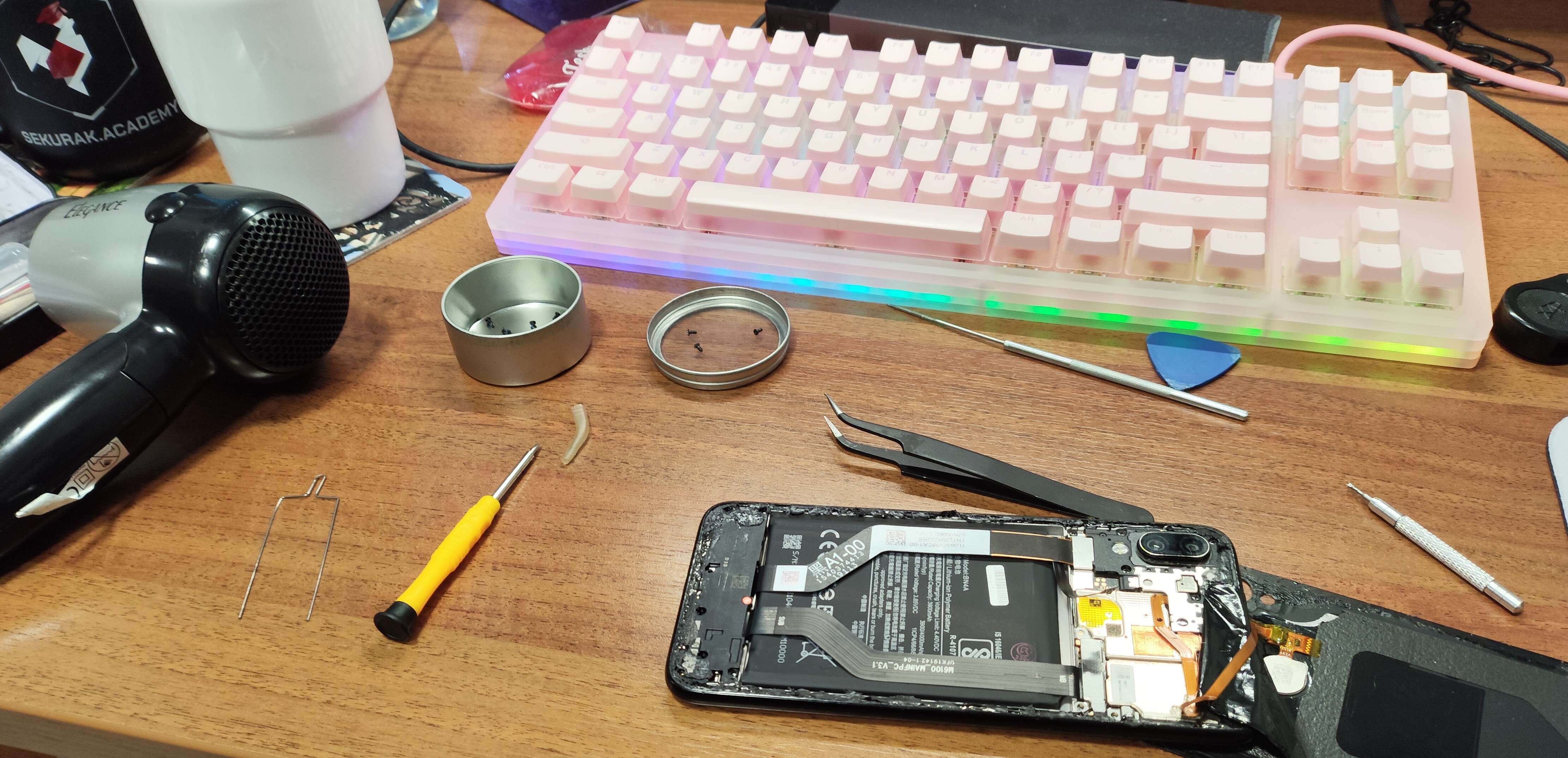
In order to check the state of the battery I have to disassemble the device. Unfortunately for me, it’s one of these phones which have their batteries buried under literally everything else, as shown here - mind that I have neither the professional tools, nor the experience in disassembling phones. “I have to improvise” is how I ended up warming the back cover glue with a hair dryer and a steel needle.
A couple unscrewed screws, torn glue and scratched protective covers later, I arrive at the battery. I pull out my universal multimeter and measure the voltage on the battery. To my complete surprise, it reads perfect 4 Volts, which is the nominal voltage of this battery. We’re in trouble - it’s not the battery.
I start to realize that this is definitely not an issue I will be able to fix with my skills - it’s a hardware failure, the device is good as dead. Out of blue, a phone that used to work a few months ago is now an expensive paperweight. I do however have the one last trump card up my sleeve that theoretically may let me recover the data.
The Obscurity
This phone runs on a Qualcomm Snapdragon 660 CPU. Qualcomm CPU’s come with a special, super-low level maintenance mode - EDL, Qualcomm Emergency Download Mode. It can be accessed in numerous ways - willingly, by shorting special pads on the motherboard, by rebooting from fastboot, by plugging in a special deep flash cable or by starting the phone with USB attached to the computer and battery unplugged. It will also start unwillingly, if the phone encounters a failure that prevents it from booting in the earliest stages.
EDL provides a serial interface for diagnostics and flashing the device. It also allows dumping the memory. [4] In order to use this mode, we need a “Firehose file”. It’s a special, model-specific file that needs to be loaded onto the device for us to access the EDL interface.
As for the EDL client, device manufacturers have their own in-house utilities such as Mi Flash. Qualcomm also has an in-house Qualcomm Product Support Tool (QPST) but we will attempt to use an open-source solution, Qualcomm Sahara / Firehose Attack Client / Diag Tools by B. Kerler. Vitally, it ships with a collection of Firehose files, you can also find and use alternative collections such as the Droidwin Firehose Collection. For the sake of clarity, from now on I will use “edl” lowercased to abbreviate this specific EDL client, as it’s the name of the command it implements.
I unplug the battery, connect the device to my computer over USB and check Device Manager. The device registers as QUSB__BULK with a warning, as Windows fails to find a suitable driver. edl README features a guide how to get the drivers, except it isn’t very clear in how to obtain a QC 9008 Serial Port driver. We get more info from reading through the automated installation script it also provides.
echo "'edl', 'zadig' installed successfully. You can now open a new PowerShell or Terminal window to use these tools."
echo ""
echo "Don't forget to run 'zadig' to install the WinUSB driver for QHSUSB_BULK devices."
So we can use zadig to install the driver, great.
Now, let’s check if edl detects the device. By the way, should you ever try to run edl, keep in mind that it’s made with python 3.9 in mind, it will produce errors on newer python versions.
main - Using loader Loaders/...
main - Waiting for the device
...main - Device detected :)
sahara - Protocol version: 2, Version supported: 1
main - Mode detected: sahara
It’s detected, but errors on “Xiaomi Auth” upon uploading the autodetected Firehose file. It seems like it picked a Firehose file for the same hardware ID, but for a different manufacturer. Fortunately, edl has a Firehose for this hardware ID for Xiaomi, as well as one supporting Xiaomi Auth. Curious what Xiaomi Auth is? It appears like Xiaomi has their own spin to EDL, which requires the Firehose file to be signed with the private key generated for each hardware ID, hence requiring explicit authorization from Xiaomi to use EDL, fun isn’t it? [3] Fortunately the internet people managed to get their hands on some of the secured Firehose files and shared them online, you can look for the patched Firehose files online.
Luckily enough, I managed to get my hands on about 4-5 different patched Firehose files that match, some of them worked and Xiaomi Auth passed successfully. Unluckily though, trying to perform any actions, especially related to memory, dumped an ocean of filesystem read errors.
firehose - [LIB]: ERROR: Failed to open the UFS Device slot 0 partition 0
firehose
firehose - [LIB]: ERROR: Failed to open the device 3 slot 0 partition 0
firehose
firehose - [LIB]: INFO: Device type 3, slot 0, partition 0, error 0
firehose
firehose - [LIB]: WARN: Get Info failed to open 3 slot 0, partition 0, error 0
firehose
firehose - [LIB]: storage_device_get_num_partition_sectors FAILED!
And here the trail goes cold, no feasible solutions were proposed to alleviate this issue, some posts suggest changing the QC 9008 Serial Port driver, but the issue remains mostly unsolved.
The Resolution
Disappointment and dismay start to take hold. Crestfallen, I start to clean up my desk and come to terms with the fact that I will not be able to recover the data, even using the most arcane of methods. Eventually, I realize that even if I were to somehow dump the flash memory, I would probably not be able to do much, as it’s encrypted using both the user password and hardware secrets, which I wouldn’t be able to recover. [5]
A killer headache mixed with fading ire slowly give way to tiredness as I take a warm shower. Loss apparently has 4 to 5 stages but I think this is a 6th one, being a mix of everything all at once. I’m depressed, I’m shocked, I accept and I start to bargain; An idea crazy in its naivety comes to mind.
As I sit down, I open the Gallery app on my current phone and scroll down to the time before the device switch. As expected, there are a few photos there, namely because of other apps I used back then, which took photos (such as social media). I chose to migrate them across devices because of their small filesize, on the contrary to the DCIM/Camera directory which was several GB in size. But wait, something is odd, there are more photos there than I expectec. As I pick one of them and view its metadata, I’m left dumbfounded.
These are, in fact, regular photos I took, the ones I was trying to recover. I go to the moment of the previous backup and merely 2 (uneventful, anyways) months of photos are missing, way before the device switch thing, other than that not a single photo is lost. How is it possible?
We now enter the realm of plausible speculations as I have no way of confirming what actually happened. I have two hypotheses.
The first one is a camera app switch. I remember switching camera apps, from the stock one to a patched Google Cam, but I’m unsure of the timeframe. Purely theoretically, the alternate camera app could save photos to a different destination than the one I used previously. I would then indeed migrate that folder to the new device, unknowingly.
The second one is an accident. During the device switch I may have unknowingly migrated all of the folders on the device, using the Android device migration feature.
The End
The fact is that I did not lose my data at all and the effort was, kind of, in vain. Call it fool’s luck, truth is that I made a grave mistake but at the very least got to tap into some super-cool stuff with Android phone servicing. I may be a bit regretful that I wasted an entire evening and got stressed out, but call it a price I had to pay for negligence. Do your backups kids.
Footnotes
[1] In case you might be wondering, automating this is no easy feat, as Android allows internal storage access through MTP, which is not a traditional filesystem access but rather object storage access - as far as I’ve tried, it’s not possible to i.e hook it up to robocopy/rsync.
[2] I did not manage to find a lot of details on this one, this post summarized the topic fairly well.
[3] There are quite a few implementations of data extraction using EDL, the general idea is fairly well described in Physical Mirror Extraction on Qualcomm-based Android Mobile Devices which makes it a pretty tidy option when compared to i.e chip-off. One company (or more?) even based their entire product on the premise of EDL device manipulation which has quite some nasty potential, i.e the Hydra Tool.
[4] It gets even worse when you learn that the only realistic way to get an authorized Firehose file, if it was not leaked, is by buying single-use credits for a flash in some tool. A pretty nifty explanation on how the auth works can be found in many edl issues, such as this one.
[5] Android implements Full Disk Encryption with keys relying on Trusted Execution Environment and Hardware Bound Keys. I recommend reading the linked specs.