Linux is not stable
I’ve started using Linux a good 7 years ago and migrated to it as my daily driver about 2 years ago. It is a great system, fun to tinker with, but sometimes it feels like it’s about to fall apart. This article is a rant, a collection of annoyances and issues I’ve accumulated so far and has not forgotten about them. It will be neither very technical nor positive.
Is Linux that bad?
Don’t get me wrong, I find Linux to be a much better OS than Windows [1], in my case mostly because of performance. I have a relatively old HP Elite x2 2in1 laptop which is - frankly speaking - atrocious when it comes to performance. 8GB of RAM is barely enough to run modern IDEs, be it IntelliJ or VSCodium [2]. The intel m5-6Y54 processor has as little as 2 cores with 1.10 GHz base frequency and thermal throttling is just insane at times. Back when I was running Windows I had to run Throttlestop [3] with maximum performance settings to make the system not hang up on opening the explorer.
Migrating to Linux helped to alleviate these pains, at least partially. I’m currently running PopOS 22.04 and I’m quite happy with it. Running High Performance setting with some custom patches makes the system at the very least usable for basic tasks and workable for more intense ones.
Another reason why I find Linux better is work comfort. It’s much more power-user friendly (duh!) and has better support for some low-level tasks, such as writing drivers for super niche wireless devices. I got used to command line, it’s much quicker to look for a command or a config, than looking for that one specific setting hidden in that one specific window hidden under one million clicks. (Thank god that godmode [4] - pun intended - exists for Windows)
To sum that up, the point of this article is to pinpoint that, while much more comfortable and efficient, Linux is far from completely stable.
Touchscreen and On-screen keyboard
One of the first issues I noticed after migrating to Linux was the inconsistent behavior of the on-screen “Caribou” keyboard that comes with GNOME DE.
Back when I was using Windows the drivers worked as such - If the keyboard is attached (it’s detachable) - disable the on-screen keyboard. Enable if it the keyboard is detached. Simple and fun. On Linux it didn’t work at all, the keyboard just randomly popped up, regardless of whether the physical keyboard is attached or not. It worked inconsistently and provided no easy way to change its behavior. To make it even worse, disabling it in the settings did next to nothing.
The solution to all my woes was installing a GNOME Extension that completely disables Caribou. As unfortunate as it is, the keyboard is completely unusable on my device.
Tailscale - Software support sucks
Tailscale [5] is pretty cool, I use it to connect to my devices to work remotely and set up a remote home lab. It usually just works, UX is great… until it isn’t. This will be an example of poor software support.
Taildrop is a pretty cool addon to Tailscale, it allows for sending files to other devices in the network. In Windows and Android the usage is reduces to, click on the file > share > send to device, and it just works. On Linux however….
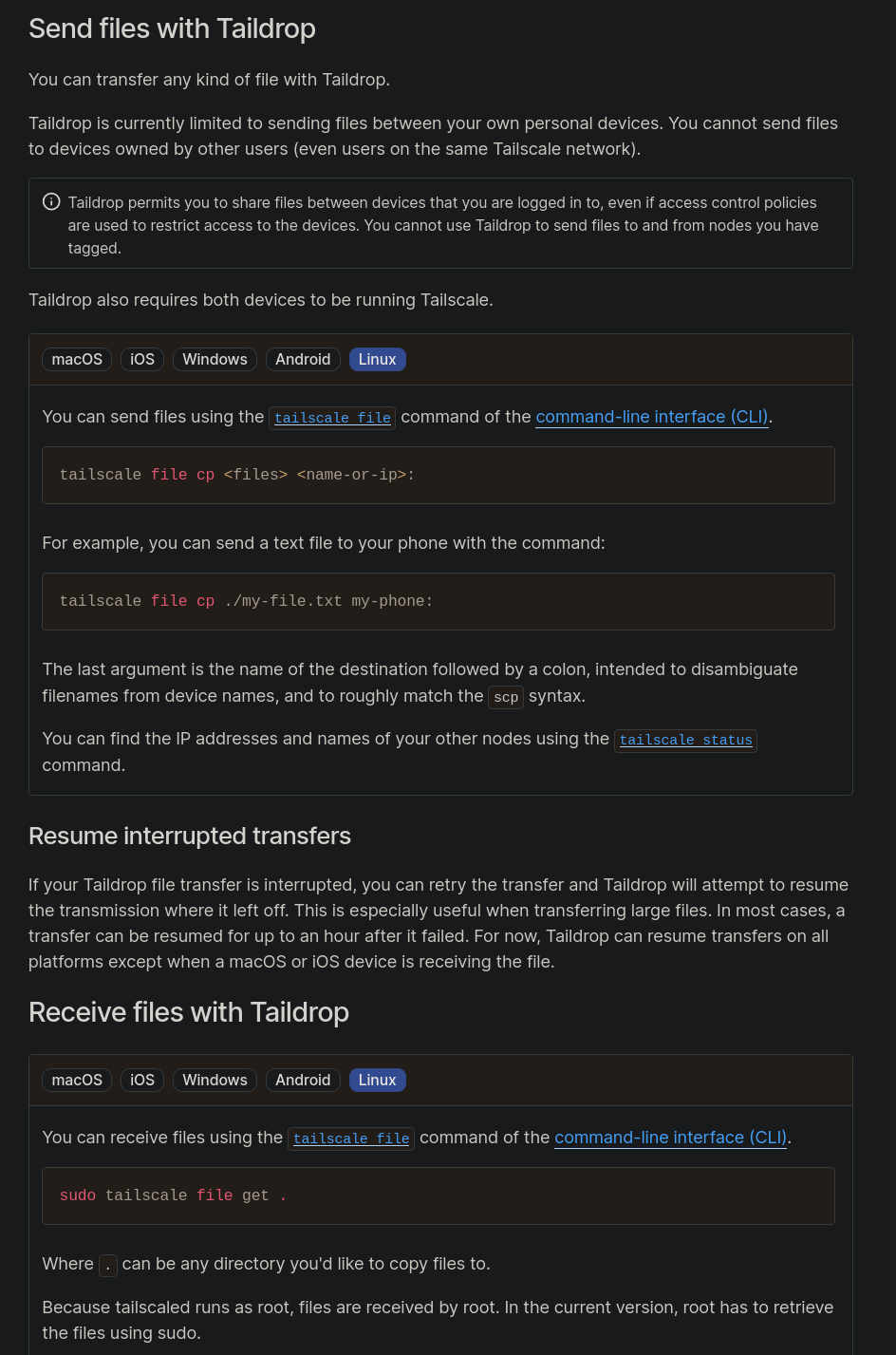
I can understand that providing a GUI element for sharing may not be that easy, after all Linux has plenty of GUI shells… but actually no, it’s not an explanation - Tailscale provides a systray GUI. But that is not the worst offender, in order to receive the file, you have to manually invoke the command that receives files, every single time.
Another, actually big problem that is far from a nitpick arised recently - suddenly, TPM support started to break for Tailscale on Linux, and a lot of users reported having to re-authenticate their machines every single reboot, myself included. While it was an accident, it made Tailscale very inconvenient to use for a good while.
(Not only) Ghidra GUI with fractional scaling
With the weird aspect ratio and dpi my screen has, fractional scaling has been a lifesaver, but it comes with caveats.
Trying to use Ghidra with fractional scaling? Good luck. The GUI will be all messed up - some parts properly resized, others not-so-much. It’s a known issue (with a solution).
Similar situation occurred with Bitwarden Linux client, which doesn’t seem to care for DPI scaling at all. This one can be quickly “solved” by using View > Zoom Out, but you have to do it every single time.
Zsh autocomplete
When I migrated to Linux, I wanted to try out an alternate shell - I went for zsh with oh-my-zsh. I’m fairly content with it, it’s much easier to use, highly customizable with great community support. Zsh stock autocomplete though…

This behavior interrupts writing commands by hanging up for a good second and requiring a Y/N answer before you can continue - catching you completely off-guard. Thankfully, this one was quickly solved by replacing stock autocomplete with fzf-tab which I highly recommend, it works amazing and is blazing fast.
My completion configs in .zshrc are as such:
autoload -Uz compinit
compinit
source $ZSH_CUSTOM/plugins/fzf-tab/fzf-tab.plugin.zsh
zstyle ':autocomplete:*' ignored-input 'apt install'
zstyle ':completion:*' list-prompt   ''
zstyle ':completion:*' select-prompt ''
Fingerprint sensor - Proprietary drivers strike again
Proprietary drivers are barely a new issue for non-Windows/MacOS systems. For the most part, hardware companies just do not feel especially compelled to release or develop drivers for Linux.
My laptop uses a VFS495 fingerprint reader, which allegedly had some community support, (which no longer seems to be the case). Allegedly, the device manufacturer released some drivers, but I was unable to locate them.
Days of research, multiple attempts at compiling custom drivers resulted in nothing. The fingerprint sensor does not work on my system, no matter the struggle. The furthest I got was compiling some driver, installing it, and running fprint_demo for it to merely try and send requests to the reader, but it simply hung up and crashed afterwards.
Also, tinkering with PAM to enable fingerprint login caused some issues with Keystores, which started prompting password to unlock them in random moments.
Below are some links, in case you are a soul just as lost as me, I pray that you’re more lucky than I was.
- A thread on the reader support
- Another thread
- One of the more recent attempts at supporting the reader, repository, the one that got me closest to working state
- Another attempt at community support, repository, didn’t work
- Another community support attempt, repository, used to work the best back in the day, allegedly
- I believe this may be the proprietary driver, but I do not remember well
Screen tearing
This is probably the worst offender. one of the first and most prominent issues was random screen tearing which forced relogging to the system - screen randomly started to tear, flicker and fill up with scanlines. Journalctl has shown the following error:
i915 0000:00:02.0: [drm] *ERROR* CPU pipe B FIFO underrun
The error is related to i915, a Linux Intel Graphics kernel driver. Searching for this obscure issue resulted in… walkarounds, most of which never worked or merely reduced the frequency of the issue appearing. The solutions were proposed in this thread. Upon applying a fairly specific combination of kernel parameters it seems to have been mostly alleviated. My /etc/sysctl.conf parameters [6] are as such:
intel_idle.max_cstate=4
intel_iommu=igfx_off
i915.enable_psr=0
For details on these parameters I recommend reading the linked thread, as well as this Arch Linux wiki article. The issue now appears sporadically. If ever, it appears on login screen - barely ever during normal usage, it still isn’t fixed though.
Also, here is the official issue in i915 repository. As of the time of writing this article - unsolved.
Conclusion
I love Linux, it’s a great OS, fun to tinker with, giving you plenty of freedom. You can learn a lot about its internals just by using it, but sometimes you learn too much. Maybe it’s just my bad luck, maybe it’s niche hardware or weird OS configuration, maybe it’s a bit of everything. Regardless of anything though, I’d never go back to Windows.
Footnotes
[1] - Recently, Windows had a good amount of insane mess-ups, such as breaking “localhost”
[2] - I’m very well aware that I may as well just go full Neovim rice setup, but when I want to code I code, not bother with learning 1 million hotkeys to select and yank text.
[3] - Throttlestop, a Windows utility for controlling CPU thermal throttling for Laptops.
[4] - godmode - A “secret menu” on Windows with almost all system management menus aggregated into a single folder, that can be normally searched through.
[5] - Tailscale - A SAAS service providing a zero-config VPN based on Wireguard, connecting devices into a full mesh.
[6] - sysctl - A tool that enables setting and reading kernel parameters during runtime.